

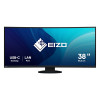
EIZO's First Ultrawide, Curved Monitor
More Space, Seamless Viewing
The 37.5-inch EV3895 is a UWQHD+ (3840 x 1600) curved ultrawide monitor with a 24:10 aspect ratio. The monitor has nearly triple the pixels to work with compared with Full HD monitors. Users can freely arrange multiple applications across its vast screen without the obtrusive bezels typical of multi-monitor setups.
See Everything at Comfortable Distance
The closer a user sits to large monitor, the greater the distance between their eyes and the far edges of the screen. A curved monitor gently brings those edges in to a more comfortable distance, improving visibility, focus, and immersion.
Operate Multiple PCs Without Switching Sources
Convenient Multi-Input Connection
The Picture-by-Picture (PbyP) function allows the monitor to receive up to three video signals simultaneously. This saves the time and hassle of switching between video and audio sources when operating more than one computer. The monitor comes with six pre-defined Picture-by-Picture layouts.
Swap Layouts at the Touch of a Button
When simultaneously displaying content from three video inputs via Picture-by-Picture (PbyP), the Main Window Swap function allows you to instantly change the layout of the windows. This provides a simple and fast way of shifting focus to any screen freely.
One Keyboard and Mouse Across Multiple PCs
The monitor is equipped with four easy-access USB Type-A ports on the side. When using Picture-by-Picture, the monitor's USB Selection function allows you to use a single mouse and keyboard to operate each screen from multiple computers. This eliminates the need for additional peripherals for each computer and keeps your desk tidy.
Streamlined Connection with USB Type-C
The monitor is equipped with a USB Type-C connection that allows users to display video, playback audio, transmit USB signals, supply power to connected devices, and even access a network signal. This convenient multi-purpose connectivity makes it faster and easier to connect your laptop when moving between workstations or working away from the office.
No Need to Carry a Bulky Power Supply
The monitor's 85 watt power delivery via USB Type-C reliably charges laptops and small desktop PCs. This eliminates the need for a laptop's bulky power supply unit, freeing up desk space.
Intelligent Software to Work Better
Screen_InStyle
Organize Your Desktop to Increase Work Efficiency
EIZO's free Screen InStyle software's Screen Layout function allows you to divide the desktop and arrange each program's window neatly across the screen to help you work smart and efficiently.
Aesthetically Pleasing Design
A monitor's aesthetic can go a long way in creating a more comfortable atmosphere. The monitor's minimalistic design and ergonomic functions, down to its stand concept, allow it to fit naturally in your work environment at the office or at home.
Slim and Frameless
The 37.5-inch curved ultrawide monitor easily blends into even smaller work spaces. It can stand on small surfaces thanks to its slim and frameless design and its small steady stand. It can easily be placed on a small desk and leave enough room to work comfortably.
Color Coordination to Suit Your Workspace
In addition to sleek black, the cabinet is available in white for a color option that keeps your workspace feeling bright. Furthermore, EIZO provides matching cables for full color coordination.
Connectivity and Flexibility
The monitor is equipped with a USB Type-C, DisplayPort, and two HDMI® ports for easily connecting to multiple devices. All ports on the back of the monitor are positioned to be within arm's reach for easy access.
Say Goodbye to Tired Eyes
The monitor is equipped with many functions to help users concentrate on work by keeping their eyes comfortable throughout the day.
Auto Brightness Control
To prevent eye fatigue, a brightness sensor called Auto EcoView detects the changes in the ambient brightness that occurs throughout the day and automatically adjusts the screen to the ideal brightness level.
Blue Light Reduced by 80%
In the visible light spectrum, blue light has wavelengths adjacent to ultraviolet light. Compared to the factory preset setting of 6500K of typical LCD monitors, Paper Mode is closer to the spectral distribution with long reddish wavelengths so it reduces the amount of blue light, a cause of eye fatigue, and helps prevent eyestrain when reading documents. When used in conjunction with Auto EcoView dimming function, blue light can be reduced by as much as 80%.
Flicker-Free Viewing
Due to the way brightness is controlled on LED backlights, a small number of people perceive flicker on their screen which causes eye fatigue. The monitor utilizes a hybrid solution to regulate brightness and make flicker unperceivable without any drawbacks like compromising color stability – even on low brightness settings.
Minimum Brightness of 1 cd/m2
In a dimly-lit work environment, a monitor with low brightness settings is more comfortable to use. With its LED backlight, the monitor is adjustable to approximately 1 cd/m² which is less than 1% of the maximum.
More Space, Seamless Viewing
The 37.5-inch EV3895 is a UWQHD+ (3840 x 1600) curved ultrawide monitor with a 24:10 aspect ratio. The monitor has nearly triple the pixels to work with compared with Full HD monitors. Users can freely arrange multiple applications across its vast screen without the obtrusive bezels typical of multi-monitor setups.
See Everything at Comfortable Distance
The closer a user sits to large monitor, the greater the distance between their eyes and the far edges of the screen. A curved monitor gently brings those edges in to a more comfortable distance, improving visibility, focus, and immersion.
Operate Multiple PCs Without Switching Sources
Convenient Multi-Input Connection
The Picture-by-Picture (PbyP) function allows the monitor to receive up to three video signals simultaneously. This saves the time and hassle of switching between video and audio sources when operating more than one computer. The monitor comes with six pre-defined Picture-by-Picture layouts.
Swap Layouts at the Touch of a Button
When simultaneously displaying content from three video inputs via Picture-by-Picture (PbyP), the Main Window Swap function allows you to instantly change the layout of the windows. This provides a simple and fast way of shifting focus to any screen freely.
One Keyboard and Mouse Across Multiple PCs
The monitor is equipped with four easy-access USB Type-A ports on the side. When using Picture-by-Picture, the monitor's USB Selection function allows you to use a single mouse and keyboard to operate each screen from multiple computers. This eliminates the need for additional peripherals for each computer and keeps your desk tidy.
Streamlined Connection with USB Type-C
The monitor is equipped with a USB Type-C connection that allows users to display video, playback audio, transmit USB signals, supply power to connected devices, and even access a network signal. This convenient multi-purpose connectivity makes it faster and easier to connect your laptop when moving between workstations or working away from the office.
No Need to Carry a Bulky Power Supply
The monitor's 85 watt power delivery via USB Type-C reliably charges laptops and small desktop PCs. This eliminates the need for a laptop's bulky power supply unit, freeing up desk space.
Intelligent Software to Work Better
Screen_InStyle
Organize Your Desktop to Increase Work Efficiency
EIZO's free Screen InStyle software's Screen Layout function allows you to divide the desktop and arrange each program's window neatly across the screen to help you work smart and efficiently.
Aesthetically Pleasing Design
A monitor's aesthetic can go a long way in creating a more comfortable atmosphere. The monitor's minimalistic design and ergonomic functions, down to its stand concept, allow it to fit naturally in your work environment at the office or at home.
Slim and Frameless
The 37.5-inch curved ultrawide monitor easily blends into even smaller work spaces. It can stand on small surfaces thanks to its slim and frameless design and its small steady stand. It can easily be placed on a small desk and leave enough room to work comfortably.
Color Coordination to Suit Your Workspace
In addition to sleek black, the cabinet is available in white for a color option that keeps your workspace feeling bright. Furthermore, EIZO provides matching cables for full color coordination.
Connectivity and Flexibility
The monitor is equipped with a USB Type-C, DisplayPort, and two HDMI® ports for easily connecting to multiple devices. All ports on the back of the monitor are positioned to be within arm's reach for easy access.
Say Goodbye to Tired Eyes
The monitor is equipped with many functions to help users concentrate on work by keeping their eyes comfortable throughout the day.
Auto Brightness Control
To prevent eye fatigue, a brightness sensor called Auto EcoView detects the changes in the ambient brightness that occurs throughout the day and automatically adjusts the screen to the ideal brightness level.
Blue Light Reduced by 80%
In the visible light spectrum, blue light has wavelengths adjacent to ultraviolet light. Compared to the factory preset setting of 6500K of typical LCD monitors, Paper Mode is closer to the spectral distribution with long reddish wavelengths so it reduces the amount of blue light, a cause of eye fatigue, and helps prevent eyestrain when reading documents. When used in conjunction with Auto EcoView dimming function, blue light can be reduced by as much as 80%.
Flicker-Free Viewing
Due to the way brightness is controlled on LED backlights, a small number of people perceive flicker on their screen which causes eye fatigue. The monitor utilizes a hybrid solution to regulate brightness and make flicker unperceivable without any drawbacks like compromising color stability – even on low brightness settings.
Minimum Brightness of 1 cd/m2
In a dimly-lit work environment, a monitor with low brightness settings is more comfortable to use. With its LED backlight, the monitor is adjustable to approximately 1 cd/m² which is less than 1% of the maximum.
Panel mounting interface
- 100 x 100 mm
Height adjustment
- Yes
Tilt adjustment
- Yes
Tilt angle range
- -5 - 35°
Swivelling
- Yes
Product Colour
- Black
Harmonized System (HS) code
- 85285210
Swivel angle range
- -70 - 70°
VESA mounting
- Yes
Warranty period
- 5 year(s)
Feet colour
- Black
Touchscreen
- No
Power consumption (typical)
- 29 W
Power consumption (standby)
- 0.5 W
Ethernet LAN
- Yes
Operating temperature (T-T)
- 5 - 35 °C
Operating relative humidity (H-H)
- 20 - 80%
Cables included
- AC, DisplayPort, HDMI, USB Type-A to USB Type-B, USB Type-C to USB Type-C
Storage temperature (T-T)
- -20 - 60 °C
Storage relative humidity (H-H)
- 10 - 90%
Certification
- CE, UKCA, CB, TÃœV/GS, TÃœV/Ergonomics (including ISO 9241-307), TCO Certified Generation 9, EPEAT 2018 (US), TÃœV/Blue Low Light Content, TÃœV/Flicker Free, RCM, cTÃœVus, FCC-B, CAN ICES-3 (B), TÃœV/S, PSE, VCCI-B, EPA ENERGY STAR, RoHS, WEEE, China RoHS, CCC
Power Consumption (max)
- 194 W
Ethernet LAN Data Rates
- 10,100,1000 Mbit/s
Ethernet LAN (RJ-45) Ports
- 1
Compliance Certificates
- CB, CCC, CE, China RoHS, Federal Communications Commission (FCC), GS mark, ICES, PSE, RCM, RoHS, cTUVus, UKCA, VCCI, WEEE
AC Input Voltage
- 100 - 240 V
AC Input Frequency
- 50/60 Hz
Quick Start Guide
- Yes
Sustainability Certificates
- ENERGY STAR, EPEAT Climate +, EPEAT Silver, TCO
Cable Lock Slot
- Yes
Display Diagonal
- 95.2 cm (37.5")
Display Resolution
- 3840 x 1600 pixels
Sustainability Compliance
- Yes
Native Aspect Ratio
- 24:10
HDM Ports Quantity
- 2
Headphone Outputs
- 1
Cable Lock Slot Type
- Kensington
HD Type
- UltraWide Quad HD+
Supported Graphics Resolutions
- 640 x 480 (VGA), 720 x 400, 800 x 600 (SVGA), 1024 x 768 (XGA), 1280 x 1024 (SXGA), 1600 x 1200 (UXGA), 1680 x 1050 (WSXGA+), 1920 x 1080 (HD 1080), 1920 x 1200 (WUXGA), 2560 x 1440, 2560 x 1600 (WQXGA), 3440 x 1440, 3840 x 1600
Built-In Speaker(s)
- Yes
Number of Speakers
- 2
RMS Rated Power
- 2 W
Response Time
- 5 ms
Market Positioning
- Office
Display Technology
- LCD
Contrast Ratio (Typical)
- 1000:1
Colour Gamut Standard
- sRGB
Panel Type
- IPS
DVI Port
- No
Built-in USB Hub
- Yes
USB Hub Version
- 3.2 Gen 1 (3.1 Gen 1)
HDCP
- Yes
Maximum Refresh Rate
- 60 Hz
HDMI
- Yes
DisplayPorts Quantity
- 1
AMD FreeSync
- No
Backlight Type
- W-LED
Depth (With Stand)
- 240 mm
Depth (Without Stand)
- 109.8 mm
Digital Horizontal Frequency
- 31 - 99 kHz
Display Brightness (Typical)
- 300 cd/m²
Energy Consumption (SDR) Per 1000 Hours
- 29 kWh
Energy Efficiency Class (SDR)
- E
Energy Efficiency Scale
- A to G
European Product Registry for Energy Labelling (EPREL) Code
- 356891
Flicker-Free Technology
- Yes
Headphone Out
- Yes
Height (With Stand)
- 411 mm
Height (Without Stand)
- 398.2 mm
Low Blue Light Technology
- Yes
Number of USB Type-C Upstream Ports Quantity
- 1
NVIDIA G-SYNC
- No
On Screen Display (OSD) Languages
- German, English, Spanish, French, Italian, Swedish
On Screen Display (OSD)
- Yes
Pixel Density
- 111 ppi
Pixel Pitch
- 0.229 x 0.229 mm
Screen Shape
- Curved
Stand Included
- Yes
USB Power Delivery Up To
- 85 W
USB Type-A Downstream Ports Quantity
- 4
USB Type-C DisplayPort Alternate Mode
- Yes
Viewable Size Diagonal
- 95.3 cm
Viewable Size, Horizontal
- 88 cm
Viewable Size, Vertical
- 36.6 cm
Weight (With Stand)
- 13.2 kg
Width (With Stand)
- 893.9 mm
Width (Without Stand)
- 893.9 mm
Display Number of Colours
- 16.78 million colours
Number of Upstream Ports
- 3
USB Upstream Port Type
- USB Type-B, USB Type-C
Viewing Angle, Horizontal
- 178°
Viewing Angle, Vertical
- 178°
Weight (Without Stand)
- 9.5 kg
Built-in KVM Switch
- Yes
Number of USB Type-B Upstream Ports Quantity
- 2
Digital Vertical Frequency
- 29 - 31 Hz
Anti-Glare Screen
- Yes
Built-in Camera
- No
LED Backlight
- Yes
Picture-by-Picture (PbP)
- Yes
Screen Curvature Rating
- 2300R
USB Power Delivery (USB PD)
- Yes
MPN
- EV3895-BK
Brand
- EIZO